
The Xagle API
The Xagle API allows you to programmatically manage clients, invoices, quotes, payments, and related resources within your Xagle system. This API provides both read and write capabilities, enabling integration with other business systems or custom tooling.
Inventory endpoints (items, stock levels, adjustments, physical counts, purchase order receiving, units of measure) are documented separately on The Xagle Inventory API page.
Communications endpoints (the unified Conversations inbox: list threads across email, SMS, WhatsApp, chat, tickets and more, read messages, send replies, manage read/archive state) are documented separately on The Xagle Communications API page.
Getting Started
For the purposes of testing, we are using Postman. You can use whatever API testing tool you prefer - The Postman collection can be found at the link below:.
Postman Collection (updated 2026-08 — includes the Inventory API)
Below are the variables we have set up for our local environment to make testing easier. Note that the token value must be retrieved using the login endpoint. More on that next.
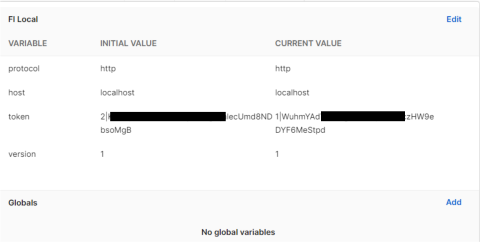
Your API auth token can be retrieved by using the Xagle login endpoint. Before doing this, it’s a good idea to create a new admin level user within your Xagle installation, which you will use for API calls. For instance, create a called api user with an email of
[email protected]and make note of the password. Next, we’ll go back to Postman and call the login endpoint with this new user’s credentials. (see example below)
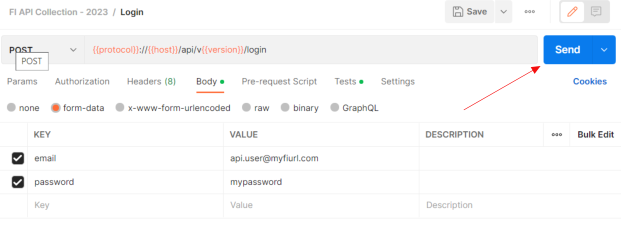
Click the Send button and your personal access token will be generated. You will see it in the response area.

At this point, you can go back to your Postman environment variables and paste in the value from the token you received. (In this example you would paste in the value starting with 2|Wlf. Do not paste the quotation marks. Now that you have a token saved to your environment, you should be able to start making API calls from Postman.
How the API endpoints are organized
Our endpoints are organized by module. The core REST resources are:
- Clients (and Client Contacts)
- Quotes
- Invoices
- Payments
- Expenses
- Vendors (and Vendor Contacts)
- Tasks
- Calendar (Events & Appointments)
- Notes (attachable to clients, invoices, quotes, payments, tasks, and vendors)
Add-on modules (Commission and Support Tickets) expose their own endpoints when the add-on is enabled — see those sections near the end of this page.
Let’s explore the Client endpoints first.
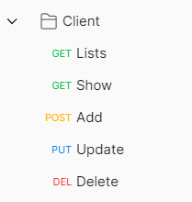
List endpoints end in the name of the module, for instance the list endpoint for clients would be something like: https://myfiurl.com/api/v1/clients
List endpoints support many query parameter options for filtering criteria:
•paginated_response
•page
•include_custom_fields
•where_operator
In addition, you can specify any valid field name that matches (or does not match) a certain value. For instance, if we wanted to retrieve a list of clients that had a timezone in America, we would add a “timezone” key and give it a value of “america”.
If you add multiple key values to filter by, the conditions are joined with an OR operator. For instance, timezone=america OR name=acme shoe repair. However, you can change the operator to an AND condition by adding the key “where_operator” and giving it a value of “AND”. The OR or AND operator works on the entire expression and at this time you cannot mix and match OR and AND operators.
Show endpoints are meant to fetch the data for a single record. In the case of a client, we would specify the ID of the client to show in the URL. Ie. https://myfiurl.com/api/v1/clients/2
Show endpoints support the include_custom_fields query parameter.
Add endpoints use a POST method and are used to add a new record. The URL is the resource collection itself. In the case of a client, https://myfiurl.com/api/v1/clients
Each add endpoint has its own required fields. For clients, the required fields are name and type (email is required only when allow_client_center_login=1). You can otherwise pass any valid field name and value pair. See each resource’s section below for the exact required fields.
Update endpoints use a PUT method and are used to update an existing record and have a URL ending with ID of the record. A client example, https://myfiurl.com/api/v1/clients/1201
List the fields name and values you would like to update. Here is a JSON body example for the client with ID 1201:
{
  "name": "Barnes and Associates",
  "city": "Tallahassee",
  "state": "FL",
  "active": 1
}
Delete endpoints use the HTTP DELETE method and are used to delete an existing record. They have a URL ending with the ID of the record. A client example, https://myfiurl.com/api/v1/clients/1302
There are no additional parameters for delete endpoints.
Formatting the request parameters
The API can accept parameters as normal URL query strings (key value pairs) or as JSON in the body of the request. The JSON collection included shows both methods in the various examples.
Base URL
All endpoints are accessed via a base URL, which generally follows this pattern:
{{protocol}}://{{host}}/api/v{{version}}/- protocol: Usually
https - host: Your Xagle installation domain (e.g.,
app.yourdomain.com) - version: The current API version (e.g.,
1)
For example:
https://app.yourdomain.com/api/v1/Notes on Authentication
The Xagle API uses Bearer Token authentication. To authenticate:
- Obtain a token by calling the
POST /loginendpoint with valid credentials. - Include the token in subsequent requests via the
Authorizationheader:
Authorization: Bearer {{token}}Only admin users (user_type = admin) with an active status may log in and obtain a token. Non-admin users receive a 401.
Request and Response Formats
- Request Formats: Endpoints generally accept JSON or form-data. Check the specific endpoint details for the required content type.
- Response Format: JSON is returned in responses unless otherwise specified.
- Error Handling: If an error occurs (e.g., validation failures, unauthorized access), the response will typically include an HTTP status code (4xx or 5xx) and a JSON payload describing the error.
Standard Response Shape & Status Codes
Most authenticated REST endpoints return a consistent envelope:
{ "success": true, "message": "...", "data": ... }The login endpoint is the exception — it returns { "token": "..." } only. Common status codes:
| HTTP | Meaning | Body shape |
| 200 | Success | { "success": true, "message": "...", "data": ... } |
| 201 | Created (e.g. notes, tasks) | { "success": true, "data": ... } |
| 401 | Not authenticated (missing/expired token) | { "error": "Unauthenticated." } |
| 403 | Forbidden (missing permission or plan block) | { "error": "Unauthorized", "message": "..." } |
| 404 | Record not found | { "success": false, "message": "..." } |
| 422 | Validation failed | { "errors": { "field": ["..."] } } |
| 429 | Rate limited | Includes a Retry-After header |
Rate Limits
Requests are throttled per bucket. When you exceed a limit you receive HTTP 429 with a Retry-After header (seconds) — back off and retry rather than bursting.
| Bucket | Default limit | Applies to |
| Login | 10 / minute per IP | POST /login |
| Authenticated | 120 / minute per user | All Bearer-authenticated REST calls (shared across every endpoint for one user) |
| Public | 60 / minute per IP | Health and language-suggestion endpoints |
The authenticated limit of 120/min is shared across all endpoints for a single user, so sustained automation should stay around 2 requests/second.
Pagination
Many listing endpoints support pagination. To enable pagination, include the query parameter paginated_response=1. The response will then include pagination metadata (like current_page, last_page, per_page).
Custom Fields
Some endpoints support include_custom_fields=1 to include custom field data. Additionally, you can filter or search using custom fields by passing parameters such as custom->column_1. Clients, invoices, quotes, payments, and expenses also expose a PATCH .../custom-fields/add endpoint for upserting custom field values.
Authentication
Login
Endpoint: POST /login
Description: Obtain a bearer token by providing valid Xagle user credentials.
Form Data Parameters:
email(string, required): Your account email.password(string, required): Your account password.
Example:
curl -X POST "{{protocol}}://{{host}}/api/v{{version}}/login" \
     -F "[email protected]" \
     -F "password=12345678"
Upon success, the response will contain a token you can use for subsequent requests.
Logout
Endpoint: POST /logout
Description: Revoke the current access token. Requires a valid bearer token. Returns 200 on success; the token can no longer be used afterward.
curl -X POST "{{protocol}}://{{host}}/api/v{{version}}/logout" \
     -H "Authorization: Bearer {{token}}"
Clients
Manage client information, including creation, retrieval, updating, and deletion.
Note on field names: in April 2026 the client's phone columns were renamed for consistency with the contacts schema. The new names are primary_phone / alternate_phone (+ matching primary_isd_code / alternate_isd_code) and two primary_is_mobile / alternate_is_mobile flags. Existing integrations that post the old names — phone, mobile, phone_isd_code, mobile_isd_code — continue to work: the API maps them to the new names automatically on POST /clients and PUT /clients/{id}. If both old and new keys are posted, the new names win. New integrations should use the new names directly.
List Clients
Endpoint: GET /clients
Query Parameters:
paginated_response(int, optional):1to paginate results.name(string, optional): Filter clients by name.- Additional filters like
active,include_custom_fields, orcustom->column_xmay be available.
Example:
curl -X GET "{{protocol}}://{{host}}/api/v{{version}}/clients?paginated_response=1&page=1" \
     -H "Authorization: Bearer {{token}}"
Show Client
Endpoint: GET /clients/{id}
Description: Retrieve details for a single client by ID.
curl -X GET "{{protocol}}://{{host}}/api/v{{version}}/clients/2" \
     -H "Authorization: Bearer {{token}}"
Add Client
Endpoint: POST /clients
Body (JSON):
Core fields
name(string, required)email(string, optional) — the client's business email (e.g.[email protected]). Required ifallow_client_center_login=1.type(string, required) — one oflead,prospect,trial,customer,affiliate,other,referral_partner,integration_partner,corporate.company_profile_id(int, optional) — defaults to the system default company profile.invoice_prefix(string, optional, max 5 chars)allow_child_accounts(int, 1 or 0, optional)third_party_bill_payer(int, 1 or 0, optional)allow_client_center_login(int, 1 or 0, optional)passwordandpassword_confirmation(required ifallow_client_center_login=1)
Address
address(string, optional)city(string, optional)state(string, optional)zip(string, optional)country(string, optional)
Phone numbers (client's own business contact info)
primary_phone(string, optional, max 20 chars) — legacy key:phone.primary_isd_code(string, optional) — country calling code prefix, e.g.+1. Legacy key:phone_isd_code.primary_is_mobile(int, 1 or 0, optional, default 0) — flag whether this phone is a mobile number.alternate_phone(string, optional, max 20 chars) — legacy key:mobile.alternate_isd_code(string, optional) — legacy key:mobile_isd_code.alternate_is_mobile(int, 1 or 0, optional, default 0).fax(string, optional)
Other
Primary Contact (optional nested object)
The client's primary contact is a separate record representing the person-at-the-company (distinct from the client's own business email/phone). If you omit this block, a primary contact is auto-seeded from the client's own fields. To set it explicitly, submit the nested payload:
primary_contact.name(string, optional, max 255)primary_contact.email(string, optional, must be a valid email)primary_contact.primary_phone(string, optional, max 20)primary_contact.primary_isd_code(string, optional)primary_contact.primary_is_mobile(int, 1 or 0, optional)primary_contact.alternate_phone(string, optional, max 20)primary_contact.alternate_isd_code(string, optional)primary_contact.alternate_is_mobile(int, 1 or 0, optional)
Example — minimal:
curl -X POST "{{protocol}}://{{host}}/api/v{{version}}/clients" \
     -H "Authorization: Bearer {{token}}" \
     -H "Content-Type: application/json" \
     -d '{
           "name": "Acme Corporation",
           "email": "[email protected]",
           "type": "customer",
           "primary_phone": "+1-555-0100",
           "primary_is_mobile": 0,
           "alternate_phone": "+1-555-0101",
           "alternate_is_mobile": 1
         }'
Example — with Primary Contact (person at the company):
curl -X POST "{{protocol}}://{{host}}/api/v{{version}}/clients" \
     -H "Authorization: Bearer {{token}}" \
     -H "Content-Type: application/json" \
     -d '{
           "name": "Acme Corporation",
           "email": "[email protected]",
           "type": "customer",
           "primary_phone": "+1-555-0100",
           "primary_contact": {
             "name": "Jane Doe",
             "email": "[email protected]",
             "primary_phone": "+1-555-0200",
             "primary_is_mobile": 1
           }
         }'
Update Client
Endpoint: PUT /clients/{id}
Description: Update client information. Accepts the same fields as POST /clients, all optional. Include only the fields you want to change. The legacy phone / mobile / phone_isd_code / mobile_isd_code names are accepted and mapped to the new names automatically.
If the primary_contact object is included, the client's existing primary contact is updated in place. Omit the object (or send an empty one) to leave the primary contact untouched.
curl -X PUT "{{protocol}}://{{host}}/api/v{{version}}/clients/33657" \
     -H "Authorization: Bearer {{token}}" \
     -H "Content-Type: application/json" \
     -d '{
           "name": "Acme Corporation (renamed)",
           "primary_phone": "+1-555-0999",
           "primary_contact": {
             "email": "[email protected]"
           }
         }'
Delete Client
Endpoint: DELETE /clients/{id}
curl -X DELETE "{{protocol}}://{{host}}/api/v{{version}}/clients/1302" \
     -H "Authorization: Bearer {{token}}"
Search Clients by Email
Endpoint: POST /clients/search/email
Description: Look up a client by email address. Requires clients.view.
curl -X POST "{{protocol}}://{{host}}/api/v{{version}}/clients/search/email" \
     -H "Authorization: Bearer {{token}}" \
     -H "Content-Type: application/json" \
     -d '{ "email": "[email protected]" }'
Add / Update Client Custom Fields
Endpoint: PATCH /clients/custom-fields/add
Description: Upsert custom field values for a client. Send the client_id plus the custom field name/value pairs. Requires clients.update.
curl -X PATCH "{{protocol}}://{{host}}/api/v{{version}}/clients/custom-fields/add" \
     -H "Authorization: Bearer {{token}}" \
     -H "Content-Type: application/json" \
     -d '{ "client_id": 1201, "column_1": "value" }'
Notes
Add transactional notes to a client, invoice, quote, payment, task, or vendor — the entries shown in the Communication tab on the corresponding view page. Useful for logging call notes, follow-ups, internal context, or any commentary from third-party integrations.
⚠️ Permission requirement: all notes endpoints require the notes.create permission on the API user. If the authenticated user lacks this permission, the request will return 403 Forbidden. When provisioning a service-account user for API integrations, make sure to assign a role that includes notes.create in addition to whatever resource-specific permissions the integration needs (e.g. clients.view, invoices.view).
Endpoints
All six endpoints accept the same request body and return the same response shape:
POST /clients/{id}/notesPOST /invoices/{id}/notesPOST /quotes/{id}/notesPOST /payments/{id}/notesPOST /tasks/{id}/notesPOST /vendors/{id}/notes
Body (JSON)
Required:
note(string) — the note content. HTML tags are stripped.
Optional:
Contact resolution rule: contact_id wins if provided; otherwise contact_email is looked up; otherwise the note has no contact attribution. Notes attributed to a specific contact appear under that contact's filter on the Communication tab; unattributed notes appear under "All Contacts" only.
Response
201 Createdwith the new note record (including its attached tags) on success.404 Not Foundif the parent resource (client, invoice, etc.) doesn’t exist.422 Unprocessable Entityon validation failure.403 Forbiddenif the API user lacks thenotes.createpermission.
Example
curl -X POST "{{protocol}}://{{host}}/api/v{{version}}/clients/1201/notes" \
     -H "Authorization: Bearer {{token}}" \
     -H "Content-Type: application/json" \
     -d '{
           "note": "Called Jake — interested in HD forks, follow up in 45 days.",
           "tags": ["fup-call", "torqueforks"],
           "is_private": false,
           "contact_email": "[email protected]"
         }'
Expenses
Allows you to list, view, add, update, and delete expenses.
List Expenses
Endpoint: GET /expenses
Query Parameters:
paginated_response=1for pagination.- Optional filters like
include_custom_fields,search, etc.
Show Expense
Endpoint: GET /expenses/{id}
curl -X GET "{{protocol}}://{{host}}/api/v{{version}}/expenses/2?include_custom_fields=1" \
     -H "Authorization: Bearer {{token}}"
Add Expense
Endpoint: POST /expenses
Body (form-data):
type(required, e.g.,standard_expense)amount(required iftype=standard_expense)- Other fields like
company_profile_id,vendor_name,category_name,description,expense_date, etc.
Update Expense
Endpoint: PUT /expenses/{id}
Description: Update an existing expense by ID. Uses form-data parameters similar to adding.
Add / Update Expense Custom Fields
Endpoint: PATCH /expenses/custom-fields/add
Description: Upsert custom field values for an expense. Send the expense_id plus the custom field name/value pairs. Requires expenses.update.
Delete Expense
Endpoint: DELETE /expenses/{id}
Vendors
Manage vendor records — the suppliers and contractors you record expenses against. Vendors live within the Expenses module but have their own dedicated endpoints for full CRUD and note creation.
List Vendors
Endpoint: GET /vendors
Query Parameters:
paginated_response(int, optional):1to paginate results.search(string, optional): keyword search across vendor name, email, phone, and mobile.
Each vendor in the response includes a contacts array with that vendor's contact records (as of July 2026).
curl -X GET "{{protocol}}://{{host}}/api/v{{version}}/vendors?paginated_response=1&page=1" \
     -H "Authorization: Bearer {{token}}"
Show Vendor
Endpoint: GET /vendors/{id}
Description: Retrieve details for a single vendor by ID. As of July 2026, the vendor's data object also includes a contacts array containing the vendor's contact records (see Vendor Contacts below).
Add Vendor
Endpoint: POST /vendors
Body (JSON):
name(string, required, max 255 chars, must be unique across vendors)email(string, optional, must be a valid email)phone(string, optional, max 20)phone_isd_code(string, optional) — country calling code prefix, e.g.+1.mobile(string, optional, max 20)mobile_isd_code(string, optional)web(string, optional, max 255)contact_names(string, optional) — legacy free-text field; create individual contact records via the Vendor Contacts endpoints instead.address(string, optional)notes(string, optional, max 65,535 chars — longer values are rejected with422 Unprocessable Entity)category_id(int or string, optional) — expense-category ID, or a category name (a new category is auto-created if it does not exist).active(int, 1 or 0, optional, default 1)
curl -X POST "{{protocol}}://{{host}}/api/v{{version}}/vendors" \
     -H "Authorization: Bearer {{token}}" \
     -H "Content-Type: application/json" \
     -d '{
           "name": "Acme Office Supply",
           "email": "[email protected]",
           "phone": "+1-555-0150",
           "active": 1
         }'
Update Vendor
Endpoint: PUT /vendors/{id}
Description: Update vendor information. Accepts the same fields as POST /vendors, all optional. Include only the fields you want to change. The name field must remain unique across vendors when changed.
Delete Vendor
Endpoint: DELETE /vendors/{id}
If the vendor has related records — expenses, shipping methods, item-master entries, or purchase orders — the request returns 400 Bad Request with a message listing the modules that block the deletion. Clear those references first, then retry.
Add Vendor Note
Endpoint: POST /vendors/{id}/notes
Add a transactional note to a vendor. See the Notes section above for the full request body and contact-resolution rules. Notes attributed to a specific vendor contact use the same morph lookup as client/invoice/quote/payment/task notes.
Quotes
Manage quotes: list, show, create, add items, custom fields, send email, and download PDF.
List Quotes
Endpoint: GET /quotes
Query Parameters:
paginated_response=1,page,include_custom_fields, etc.
Show Quote
Endpoint: GET /quotes/{id}
Add Quote
Endpoint: POST /quotes
Form Data Parameters:
client_nameorclient_idquote_date(Y-m-d)company_profile_id
Delete Quote
Endpoint: DELETE /quotes/{id}
Add Quote Items
Endpoint: PUT /quotes/items/add
Body (JSON):
quote_id(int)name(string)quantity(int)price(numeric)
Add Custom Field to Quote
Endpoint: PATCH /quotes/custom-fields/add
Body (JSON):
quote_idcolumn_1(example custom field)
Send Quote via Email
Endpoint: POST /quotes/email
Form Data Parameters:
id(quote ID)subjectto[]attach_pdf(0 or 1)
Download Quote PDF
Endpoint: GET /quotes/{id}/pdf
Invoices
Manage invoices: list, show, create, add items, send email, download PDF, and apply credit memos.
List Invoices
Endpoint: GET /invoices
Query Parameters:
paginated_response=1,page,include_custom_fields,status, etc.
Show Invoice
Endpoint: GET /invoices/{id}
Download Invoice PDF
Endpoint: GET /invoices/{id}/pdf
Send Invoice via Email
Endpoint: POST /invoices/email
Form Data Parameters:
id(invoice ID)subjectto[]attach_pdf(0 or 1)
Add Invoice
Endpoint: POST /invoices
Form Data Parameters:
company_profile_id(required)client_idorclient_name(one is required)invoice_date(required, Y-m-d)
Apply Credit Memo to Invoice
Endpoint: POST /invoices/apply/credit-memo
Form Data Parameters:
invoice_idcredit_memo_idamount
Add Invoice Items
Endpoint: PUT /invoices/items/add
Body (JSON):
invoice_idnamequantityprice
Add Custom Field to Invoice
Endpoint: PATCH /invoices/custom-fields/add
Body (JSON): invoice_id plus custom field name/value pairs (e.g. column_1). Requires invoices.update.
Delete Invoice
Endpoint: DELETE /invoices/{id}
Payments
Manage payments: list, show, add, and delete.
List Payments
Endpoint: GET /payments
Show Payment
Endpoint: GET /payments/{id}
Add Payment
Endpoint: POST /payments
Form Data Parameters (all required):
client_idinvoice_idpaid_at(date)amountpayment_method_id
The amount must not exceed the invoice's outstanding balance. Some payment-term types require a payment_terms_discount value, and certain terms block payment entry through the API entirely.
Add Custom Fields to Payment
Endpoint: PATCH /payments/custom-fields/add
Delete Payment
Endpoint: DELETE /payments/{id}
Client Contacts
Manage client contacts associated with a particular client.
List Client Contacts
Endpoint: GET /client/contact/{client_id}
Lists all contacts associated with the given client ID.
Show Client Contact
Endpoint: GET /client/contact/view/{id}
Add Contact
Endpoint: POST /client/contact
Form Data Parameters:
titlenameprimary_isd_code,primary_phone,primary_is_mobilealternate_isd_code,alternate_phone,alternate_is_mobileemaildefault_to,default_cc,default_bcc(1 or 0)notesclient_id
Update Contact
Endpoint: PUT /client/contact/{id}
Body (JSON): Fields similar to adding a contact.
Delete Contact
Endpoint: DELETE /client/contact/{id}
Vendor Contacts
Manage individual contacts (people) attached to a vendor. Mirrors the Client Contacts endpoints but scoped to vendors.
List Vendor Contacts
Endpoint: GET /vendor/contact/{vendor_id}
Lists all contacts attached to the given vendor ID. Supports paginated_response=1 and a search keyword.
Show Vendor Contact
Endpoint: GET /vendor/contact/view/{id}
Only contacts whose parent is a vendor are returned by this endpoint; client contacts cannot be accessed through it.
Add Vendor Contact
Endpoint: POST /vendor/contact
Body (JSON):
name(string, required)email(string, required, valid email)vendor_id(int, required) — the parent vendor. Alternatively sendcontact_iddirectly (the morph identifier the contacts table stores).title(string, optional)primary_phone,primary_isd_code,primary_is_mobile(optional)alternate_phone,alternate_isd_code,alternate_is_mobile(optional)default_to,default_cc,default_bcc(1 or 0, optional)notes(string, optional, max 65,535 chars — longer values are rejected with422 Unprocessable Entity)
curl -X POST "{{protocol}}://{{host}}/api/v{{version}}/vendor/contact" \
     -H "Authorization: Bearer {{token}}" \
     -H "Content-Type: application/json" \
     -d '{
           "vendor_id": 42,
           "name": "Pat Lee",
           "email": "[email protected]",
           "primary_phone": "+1-555-0151"
         }'
Update Vendor Contact
Endpoint: PUT /vendor/contact/{id}
Body (JSON): fields similar to adding a contact. The contact's parent vendor cannot be reassigned through this endpoint.
Delete Vendor Contact
Endpoint: DELETE /vendor/contact/{id}
Tasks
Manage tasks: list, show, create, update, and delete.
List Tasks
Endpoint: GET /tasks
Query Parameters:
paginated_response(int, optional):1to paginate results.search(string, optional): keyword search across task fields.status(string, optional): filter by status. Defaults toopen.from_date(date, optional): filter by due-date range start.to_date(date, optional): filter by due-date range end.
Show Task
Endpoint: GET /tasks/{id}
Retrieve a single task by ID.
Add Task
Endpoint: POST /tasks
Body (JSON or form-data):
Required:
title(string)assignee_id(int) — must reference an existing user.task_section_id(int) — must reference an existing task section.
Optional:
description(string)due_date(date or datetime, e.g.2026-04-25or2026-04-25 02:30 PM)client_id(int)is_recurring(int,0or1)recurring_frequency(int)recurring_period(string) — e.g.day,week,month
Response: { "success": true, "message": "...", "task_id": <new id> }
Update Task
Endpoint: PUT /tasks/{id}
Body (JSON or form-data):
Required:
title(string)
Optional: all of the Add Task fields above, plus:
is_complete(int,0or1) — mark the task complete or reopen it. Only updated when the field is sent.completion_note(string)
Delete Task
Endpoint: DELETE /tasks/{id}
Permanently deletes a task.
Calendar
Manage calendar events and appointment scheduling. Calendar endpoints require the calendar.* permissions. Note that the Calendar API uses explicit path suffixes (/create, /show, /update, /delete) and uses POST (not PUT) for updates.
Calendar Events
List Events
Endpoint: GET /calendar/events — permission calendar.view
Query Parameters:
from_date(date, optional) — defaults to the start of the current month.to_date(date, optional) — defaults to the end of the current month.event_types(string, optional) — comma-separated list ofmeeting,reminder,unavailable,company_event.search(string, optional).
Create Event
Endpoint: POST /calendar/events/create — permission calendar.create
Required:
title(string)event_type(string) — one ofmeeting,reminder,unavailable,company_event.start_date(date/datetime)
Optional:
end_date,locationis_all_day,allow_overlap(1 or 0)client_id,owner_idinvites[](email addresses),send_invites(1 or 0)duration_minutes(int)is_recurring(1 or 0). When1, also supplyrecurrence_frequency(daily,weekly,monthly,yearly),recurrence_interval(int ≥ 1), andrecurrence_end_date.
For company_event types, group_id is required. Returns 201 with the created event.
Show Event
Endpoint: GET /calendar/events/{id}/show — permission calendar.view
Update Event
Endpoint: POST /calendar/events/{id}/update — permission calendar.update
Accepts the same fields as create. For a recurring series, send edit_type=single together with instance_date to change only one occurrence.
Delete Event
Endpoint: DELETE /calendar/events/{id}/delete — permission calendar.delete
For recurring events, send delete_type (single or all) and, for a single occurrence, instance_date.
Appointment Schedules
Schedules define bookable availability windows used by the appointment booking system.
List Schedules
Endpoint: GET /calendar/appointments/schedules — permission calendar.view
Create Schedule
Endpoint: POST /calendar/appointments/schedules/create — permission calendar.create
Required:
availability_title(string, max 255)working_hours_start/working_hours_end(timeH:i; end must be after start)min_appointment_duration/max_appointment_duration(minutes; one of 15, 30, 45, 60, 90, 120, 180, 240, 300, 360, 420, 480; max ≥ min and must fit within working hours)days_of_week[](at least one ofsunday…saturday)future_booking_limit(one of1week,2weeks,3weeks,1month,2months,3months,6months,1year)appointment_background_color/appointment_text_color(hex, e.g.#3B82F6)
Optional: buffer_time_minutes (0–480), auto_confirm, max_daily_appointments (0–24), icon, reminder_timing[], is_active, owner_id.
Show / Update / Delete Schedule
GET /calendar/appointments/schedules/{id}/showPOST /calendar/appointments/schedules/{id}/updateDELETE /calendar/appointments/schedules/{id}/delete
Get Available Slots
Endpoint: GET /calendar/appointments/schedules/{id}/slots — permission calendar.view. Returns bookable time slots for the schedule.
Appointments
List Appointments
Endpoint: GET /calendar/appointments — permission calendar.view
Create Appointment
Endpoint: POST /calendar/appointments/create — permission calendar.create
Required:
schedule_id(int)client_name(string, max 255)client_email(valid email)start_datetime(must be in the future)
Optional: client_phone, client_company, duration (5–480 minutes), client_notes (max 1000), referral_token.
Show / Update / Delete Appointment
GET /calendar/appointments/{id}/showPOST /calendar/appointments/{id}/updatePOST /calendar/appointments/{id}/update-slot— move an appointment to a different time slot.DELETE /calendar/appointments/{id}/delete
Commission API (add-on)
Available only when the Commission add-on is enabled. These endpoints manage affiliate commissions and require the commission.* permissions. Like other add-on APIs, they use explicit path suffixes.
Base path: /api/v1/commission/affiliate-commissions — Bearer token required.
| Method | Path | Permission | Description |
| GET | / |
commission.view |
List affiliate commissions |
| POST | /store |
commission.create |
Create a commission |
| GET | /{id}/show |
commission.view |
Get one commission |
| POST | /{id}/status |
commission.update |
Change commission status |
| PUT | /{id}/update |
commission.update |
Update a commission |
| DELETE | /{id}/delete |
commission.delete |
Delete a commission |
Support Tickets API (add-on)
Available only when the Support Tickets add-on is enabled. These endpoints require the support_ticket.* permissions and a Bearer token. If the add-on is disabled, all endpoints return 404 with { "success": false, "message": "..." }.
Base path: /api/v1/support-tickets — Bearer token required. Like Calendar, these routes use explicit path suffixes (/create, /show, /update, /delete) and use POST (not PUT) for updates.
| Method | Path | Permission | Description |
| GET | / |
support_ticket.view |
List tickets (supports filters) |
| POST | /create |
support_ticket.create |
Create a ticket |
| GET | /{id}/show |
support_ticket.view |
Get ticket + threads |
| POST | /{id}/update |
support_ticket.update |
Update ticket metadata |
| POST | /{id}/reply |
support_ticket.update |
Send an outbound email reply |
| POST | /{id}/notes |
support_ticket.update |
Add an internal note |
| POST | /{id}/mark-read-unread |
support_ticket.update |
Mark a ticket read or unread for the current user |
| DELETE | /{id}/delete |
support_ticket.delete |
Soft-delete a ticket |
Important request-format rules:
- Use JSON for Update, Notes, and Mark Read/Unread requests. Create and Reply also accept JSON when you are not uploading files.
- Use multipart/form-data for Create or Reply only when attaching files (
support_file). Do not setContent-Typemanually for form-data; your client sets the multipart boundary. - Use POST for
{id}/update— never PUT. PHP does not parsemultipart/form-dataon PUT, so fields would appear missing and return422. - Attachments use the field name
support_file(array): up to 6 files, about 10 MB each. Sending email (create withsend_email, or reply) requires a configured Mail From Address for the chosen support mailbox type.
List Tickets
Endpoint: GET /api/v1/support-tickets/ — permission support_ticket.view
Query Parameters:
search(string, optional) — keyword search across ticket fields.status(string, optional) — one ofnew,active,awaiting_response,on_hold,closed,archived,all_open_tickets,new_and_active.ticket_type(string, optional) — filter by support mailbox type key.client(int/string, optional) — filter by client.assigned_to(int, optional) — filter by assigned user ID.from_date/to_date(date, optional) — date range filter.paginated_response(int, optional): set to1to paginate; otherwise all matching tickets are returned.page(int, optional) — page number when paginating.is_unread(int, optional) —1= unread only,0= read only, for the authenticated user.
Response (200): { "success": true, "message": "...", "data": [ /* tickets */ ] } (or a paginated object when paginated_response=1).
Each ticket in data includes is_unread (0 or 1) for the current user — 1 if that user has an unread marker or the ticket is unassigned; otherwise 0.
Show Ticket
Endpoint: GET /api/v1/support-tickets/{id}/show — permission support_ticket.view
Query Parameters:
thread_limit(int, optional) — max thread rows to return; defaults to20.
Response (200): { "success": true, "message": "...", "data": { "ticket": { /* ... */, "is_unread": 0|1 }, "threads": [ /* ... */ ] } }. Returns 404 if the ticket is not found.
data.ticket.is_unread uses the same meaning as List. When the ticket has an assigned_to, show still clears that user's unread markers after computing the flag, so the returned is_unread is the value at request time; use POST …/mark-read-unread to set unread deliberately.
Create Ticket
Endpoint: POST /api/v1/support-tickets/create — permission support_ticket.create
Body (JSON, or multipart/form-data when uploading files):
Required:
type(string) — support mailbox type key from Support Tickets settings.message(string) — initial thread body (email or note).- Either
client_id(int) oremail_address(string) — if no client is supplied,email_addressis required.
Conditional:
send_email(boolean, optional, default false) — whentrue, sends an outbound email and requiressubject; whenfalse, creates an internal note thread and requiressummary.subject(string) — required whensend_emailis true.summary(string) — required whensend_emailis false.recipient_email(string) — required in some cases when emailing an existing client without a recipient (resolved against client contacts when provided).
Optional:
is_closed(boolean) — create as closed when true; otherwise status starts asnew(orawaiting_responseafter a successful email send).assigned_to(int, nullable) — user ID.tags(array of strings)cc(array of email addresses) — used when sending email.support_file(file array) — up to 6 files, about 10 MB each.
Response (201): { "success": true, "message": "...", "data": { "ticket_id": <id>, "ticket_number": "..." } }. Validation failures return 422.
Update Ticket
Endpoint: POST /api/v1/support-tickets/{id}/update — permission support_ticket.update (always POST, never PUT)
Body (JSON):
Required:
status(string) — one ofactive,awaiting_response,closed,on_hold(writable statuses excludenew).type(string) — support mailbox type key.assigned_to(int) — required unlessstatusison_hold.
Optional:
subject(string)summary(string)issue_id(int, nullable) — existing ticket issue ID.hold_until(date, optional) — used whenstatusison_hold; cleared for other statuses.tags(array of strings)
Response (200): { "success": true, "message": "...", "data": { /* updated ticket */ } }. Returns 404 if not found; 422 on validation errors.
Reply
Endpoint: POST /api/v1/support-tickets/{id}/reply — permission support_ticket.update
Always sends an outbound email reply. A Mail From Address must be configured for the chosen mailbox type.
Body (JSON, or multipart/form-data when uploading files):
Required:
subject(string)message(string)status(string) — one ofactive,awaiting_response,closed,on_hold.type(string)assigned_to(int) — user ID.
Optional:
summary(string)issue_id(int, nullable)hold_until(date)tags(array of strings)cc(array of email addresses)recipient_email(string) — defaults to the ticket contact/client email when omitted.support_file(file array) — up to 6 files, about 10 MB each.
Response (200): { "success": true, "message": "...", "data": { "thread_id": <id> } }. Returns 400 if no recipient email can be resolved; 404 if the ticket is not found; 422 on validation errors.
Add Note
Endpoint: POST /api/v1/support-tickets/{id}/notes — permission support_ticket.update
Body (JSON):
Required:
note(string) — internal note body (supports @mentions).
Response (201): { "success": true, "message": "...", "data": { "thread_id": <id> } }.
Mark Read / Unread
Endpoint: POST /api/v1/support-tickets/{id}/mark-read-unread — permission support_ticket.update
Body (JSON):
type(string) — send"unread"to mark the ticket unread for the current user; any other value marks it read.
Response (200): { "success": true, "message": "...", "data": { "ticket_id": <id>, "is_unread": 0|1 } }.
List and Show also expose is_unread on ticket payloads (see above).
Delete Ticket
Endpoint: DELETE /api/v1/support-tickets/{id}/delete — permission support_ticket.delete
Soft-deletes the ticket. No request body.
Response (200): { "success": true, "message": "..." }. Returns 404 if the ticket is not found.
Deprecated Paths
Core REST resources prefer standard paths without action suffixes. The following older paths still work for backwards compatibility but should not be used in new integrations:
| Deprecated | Use instead |
POST .../store |
POST .../ |
PUT .../update/{id} or POST .../{id}/update |
PUT .../{id} |
GET .../{id}/show |
GET .../{id} |
DELETE .../{id}/delete |
DELETE .../{id} |
The HTTP method for deletes is DELETE. Exception: the Calendar, Commission, and Support Tickets APIs intentionally use explicit /create, /show, /update, and /delete suffixes as documented in their sections above.
Distinguishing Auth Errors from Edge Rate-Limit Errors
Two very different failures can look like “access denied” to a client library, and they need different handling. Branch on the response shape, not just the status code family:
API authentication failure (HTTP 401)
Returned by the Xagle application when the bearer token is missing, invalid, or expired. Fix: obtain a new token via POST /login and retry the request.
{"error": "Unauthenticated."}Edge rate limit or IP ban (HTTP 429 / 403, served by Cloudflare)
Returned by the Cloudflare edge in front of the API, not by Xagle itself — re-authenticating will not help. A 429 response includes a Retry-After header; wait that long, then retry. A 403 carrying Cloudflare error code 1006 means the calling IP is temporarily banned; back off for several minutes before retrying.
{"error_code": 1006, "error_name": "ip_banned"}Client libraries should treat 401 as “refresh credentials and retry” and 429/1006 as “back off”. Never retry a rate-limited request in a tight loop — continued traffic can extend the ban.
Additional Notes
- Always include the bearer token in authorized requests.
- For complex filtering and searching, refer to the query parameters shown in examples.
- If you encounter issues or need clarification on any endpoint, please contact Xagle support.